NotNow Light
The desk companion
- 1.28″ round color touch display
- USB-C powered — set it and forget it
- Wi-Fi · Bluetooth · USB
- Perfect on the monitor or the desk
 Get the early-bird price
Coming soon on Kickstarter
NotNow Light is a small round display for your desk, your monitor, or your door. It watches your calendar and your microphone — and the moment a meeting starts, it tells everyone around you, in plain words: “In a meeting · free at 3:00.” Hang up, and it clears itself. You never touch it.
The problem
9:58. You’re two minutes from the pitch of the quarter. The door swings open — “can you drive me to practice?” — and you do the move every remote worker knows: one hand lunging for mute, the other waving them off, your face apologizing to nine people at once.
It’s not their fault. You gave them nothing to work with. A closed door is a guess. A red dot is a riddle. The question your family is actually asking isn’t “are you busy?” — it’s “when can I have you back?”
NotNow Light answers it, in words, on a screen by the door: “In a meeting · free at 3:00.” Nothing to memorize. Nothing to check. They just… read it, and come back at 3.
Field reports — the problem, documented
“I want to put a light outside of my home office… I can’t be the only one who wants this, but I also can’t find it anywhere.”
“I mentioned it to my wife and she scoffed at the idea, saying that she ‘doesn’t interrupt me that much’ so… YMMV.”
“I have people coming into my room all the time, even when I am already on a call.”
“I could hear the boys outside whispering to each other ‘ssh, it’s red! Daddy’s on the phone!’”
What one interruption costs
“It was resumed, on average, in 23 minutes and 15 seconds” — that’s how long an interrupted task waits before you actually get back to it.
How it works
Twelve watchfaces — from a flip clock to a blinking terminal — six live weather faces, your own photos, any GIF. It earns its shelf space on the days nobody interrupts you at all.
It reads your Google, Microsoft or iCloud calendar — and understands it: declined invites don’t flip it, back-to-back calls hold it. The room sees “In a meeting · until 10:30” — words a five-year-old can work with.
When any app opens your microphone — Zoom, Teams, Meet, Slack, anything — the light goes busy on its own. No forgotten toggles. No lying light.
Back to green, back to the clock. Nobody had to text you from outside the door to find out.
Lunch. On air. “Back at 3.” Write your own statuses — your words, your colors, your screens — and fire them with a tap on the device or from your phone.
The app
There’s no dashboard to babysit. The companion app sits in the corner of your screen, quietly reading your calendar. And when you want to say something yourself: click, pick, done — every paired light updates in the same second.
Private by design — everything happens on your computer.
Simulated app — try the menu.
Off duty
Most status gadgets are dead plastic between meetings. NotNow Light stays worth looking at — a clock, the live weather, your photos, or any GIF on the internet.
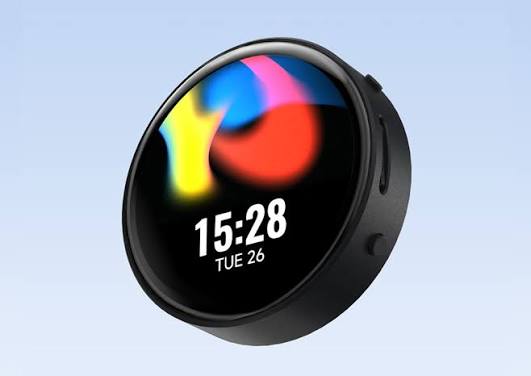
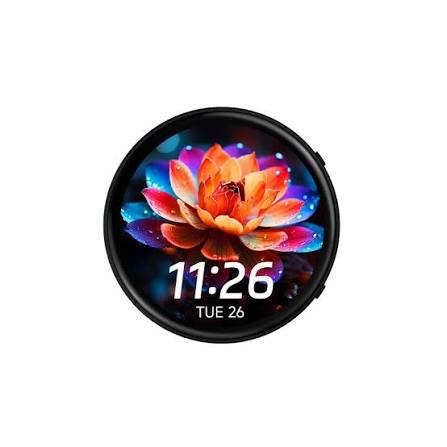
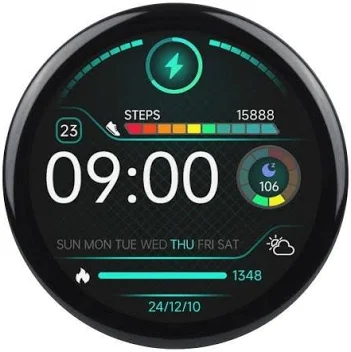
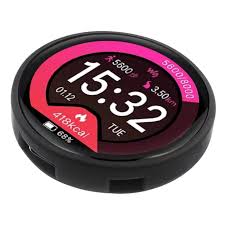
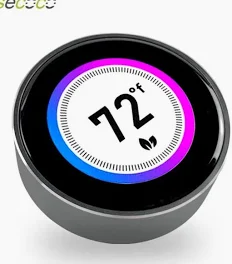
And none of it is fixed. Recolor it, relabel it, animate it — or grab a new look from the Faces store in one tap, and publish your own.
Early photos of engineering prototypes — final device shown at launch.
Desk · Door · Living room · Office
It isn’t chained to a USB port. Wi-Fi carries your status across the house; battery power (Pro) takes it places no outlet reaches. Pair as many as you like — the moment your meeting starts, every one of them flips at once, and the answer to “are you busy?” is already hanging wherever the question comes up. One status, every room.
Facing the room, not you. Your family sees “free at 3:00” before they’re in frame on your call.
The polite version of a locked door. Kids read a countdown better than they read a red dot.
The room where everyone already is. The question gets answered before anyone climbs the stairs to ask it.
Headphones get ignored. Words don’t. It’s a do-not-disturb sign your coworkers can’t pretend they didn’t see.
Ecosystem
A status is only useful where people actually look. NotNow Light pushes yours to your phone, your smart home, and thousands of apps.
Set your status from the couch. Check it from the train.
When you go busy, anything can happen: pause notifications, silence your phone, start a time log, turn the porch light red. Thousands of apps, zero code.
Wire your status into Home Assistant and every smart bulb you own.
notnow/status → "busy · until 10:30"
Two sizes
⌀ 1.28″ display
⌀ 1.85″ display
Shown at relative scale.
The desk companion
The go-anywhere sign
Yours to keep
Every NotNow Light registers to your account the moment you power it up — and it stays yours. On top of that, every account comes with five slots for your own hardware. Need more? You buy them once. No monthly fee, no expiry, nothing to renew.
Every Light and Pro you buy registers itself to your account — first-party, free, and yours for good. Pair as many as you own.
Already have an ESP32 board? Bring your own device. Every account includes five bring-your-own-hardware slots at no extra cost.
Slots are a one-time purchase, not a rental. They never expire and never bill you again. Outgrow your five? Add extra slots whenever you like.
One-time purchase · no subscription · no expiry.
The plan
Hardware is hard; surprises are optional. Here’s exactly where your pledge goes.
The campaign funds and your early-bird price locks in.
The enclosure moves to injection-mold tooling; firmware goes feature-freeze.
iOS and Android land on the App Store and Google Play. Windows and macOS are ready today.
Every unit assembled, flashed, activated, and burn-in tested.
First units ship to backers — earliest tiers first.
Specs
FAQ
No. The companion app checks a single yes/no signal from your operating system: is the microphone in use? No audio is captured or leaves your computer, and the device itself has no microphone at all.
Google, Microsoft and iCloud calendars for scheduled meetings; mic detection covers every meeting app — Zoom, Teams, Meet, Slack huddles, Discord, anything that opens your microphone. Beyond that: Zapier for thousands of apps, and MQTT for Home Assistant and the rest of your smart home.
Same features, same apps, same store. Light has a 1.28″ display and is powered over USB-C — ideal for the desk or monitor. Pro has a bigger 1.85″ display and a built-in battery, so it can live on a door or a kitchen shelf with no cable at all.
Yes — that's the point. Pair as many as you like; your status broadcasts to all of them at once. Desk + door is the classic setup. Mix Light and Pro freely.
Automatic calendar and mic detection is driven by the companion app on the machine you take calls on — Windows or macOS. You can also set your status from the Android or iOS app, from Zapier, or over MQTT. The device itself connects over Wi-Fi, Bluetooth, or USB.
The official desktop apps are Windows and macOS first. But the device speaks MQTT and a documented protocol over USB, Wi-Fi and Bluetooth — if you're the kind of person who asks this question, you'll have it scripted in an afternoon.
No. Everything described on this page ships with the device, no monthly fee. We sell a gadget, not a hostage.
Later this year — we're locking the campaign now. The list hears the exact date 48 hours before anyone else, and the deepest early-bird tier is capped, so list members get first shot at it.
About four months after the campaign closes — funding, injection-mold tooling, app-store releases, assembly and testing, then boxes on trucks. The full plan is laid out above, and backers get progress updates at every step.
We plan to ship worldwide; exact regions and shipping costs are confirmed on the campaign page before you pledge.
Be first through the door — ironically
Sign up and you’ll get the launch date before anyone else, plus the deepest early-bird tier — on both Light and Pro. Three or four emails total, then silence.
We only email about the launch. Unsubscribe anytime.
Coming soon on Kickstarter
Placeholder — the real campaign film is in production.